Building Email Systems That Scale: Why We Stopped Using Templates
January 2, 2026
We had a problem that looks simple on the surface but becomes a nightmare at scale: sending emails.
Specifically, we were using Supabase's built-in email templates for password resets, sign-ups, magic links, and user invitations. It worked fine initially, but as we added more products and different brands (Cently, Upcaret), we hit a wall. We couldn't customize emails per brand. We couldn't iterate quickly. We couldn't track what was actually being sent. And when something broke, debugging meant digging through Supabase's logs instead of our own code.
So we did something that looks backwards at first - we built our own email system. But the more we thought about it, the more it made sense.
The "good enough" trap
Supabase's auth templates were good enough. They worked. They got delivered. The problem was that "good enough" doesn't scale when you want to:
- Brand emails differently for different products
- Update copy without deploying
- See exactly what your email system is doing
- Control retry logic and delivery guarantees
- Track which emails actually matter to your users
We kept thinking we should optimize something else. But every time we wanted to improve an email experience, we hit the same wall: we couldn't own it.
What we built instead
We created auth-emailer - an Edge Function that handles all our authentication emails in one place. Instead of relying on Supabase templates, we own the entire email pipeline.
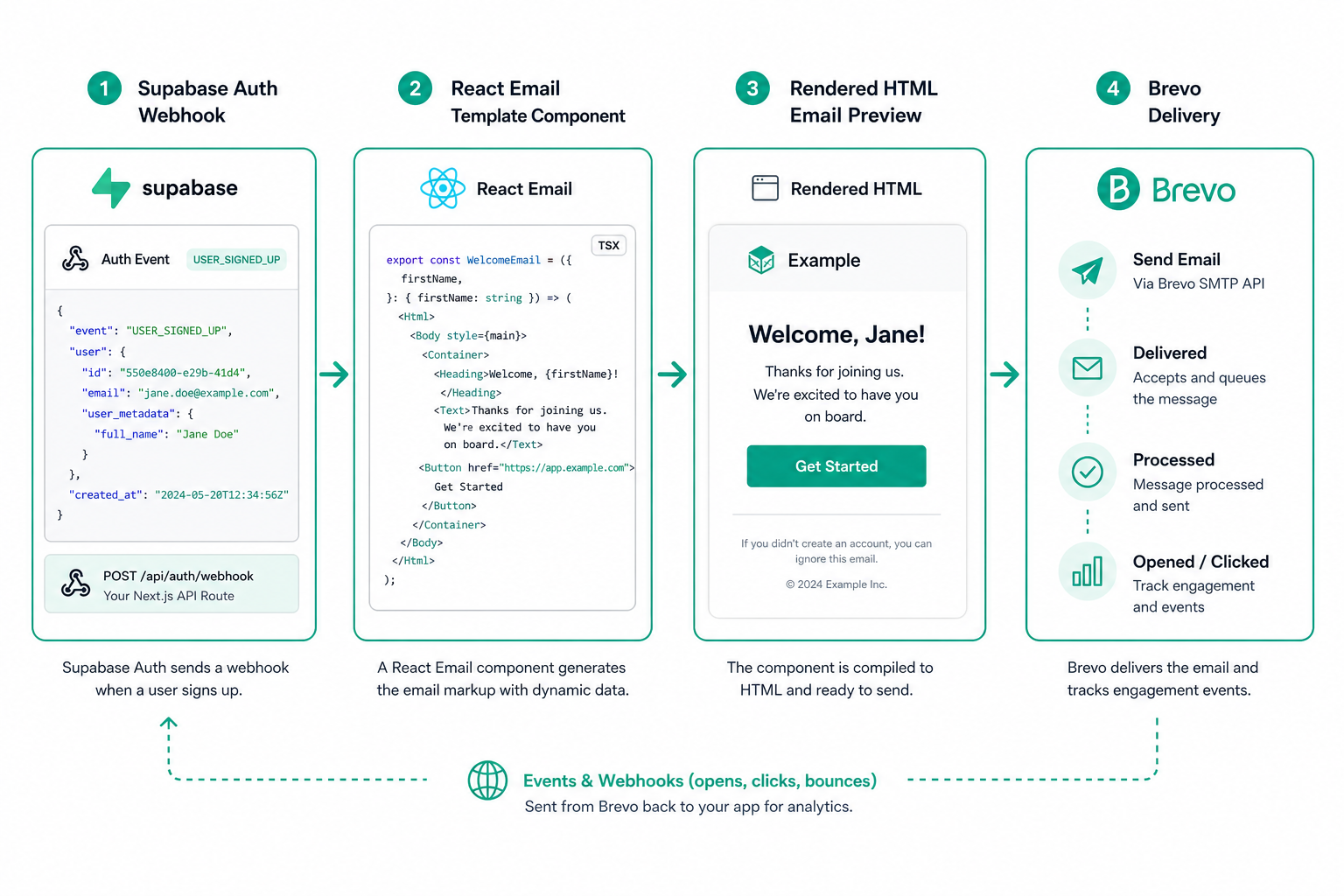
Here's what changed:
First, we wrote React email templates. Yeah, React. We use react-email to build beautiful, type-safe email components that compile to clean HTML. Each email type - signup confirmation, password reset, magic link, user invite - is now a proper React component with its own logic and styling.
export const ResetPasswordEmail = ({ brand, actionLink, email }) => (
  <Email>
    <Container>
      <Text>{brand.productName} Password Reset</Text>
      <Link href={actionLink}>Reset your password</Link>
      <Text>This link expires in 1 hour.</Text>
    </Container>
  </Email>
);
Second, we built brand awareness into the system. The same email template renders completely differently depending on which product is sending it. Logo, colors, product name, support links - all configurable per brand. We define this once in brand.ts and every email automatically gets the right branding.
Third, we own the delivery. We parse the request from Supabase auth, render the email to HTML, and send it through Brevo. We see exactly what's being sent, to whom, and when. If something fails, we can debug it in our own logs.
Why this matters
The real breakthrough came when we realized this approach solves three separate problems:
1. Customization becomes easy. Want to change the reset password email copy? Update one component, deploy, done. No coordinating with Supabase. No waiting for updates. We control the iteration speed.
2. Brand consistency is guaranteed. We have three different products now. The same auth flow, completely different experiences. Each one gets its own branding, tone, and messaging. But they all use the same underlying system.
3. Debugging is possible. When a customer says "I didn't get my reset email," we can trace exactly what happened. We can see the request payload, the rendered HTML, the Brevo response. It's all in our logs, in our control.
The technical details
The implementation is cleaner than it sounds. Supabase auth fires webhooks to our auth-emailer function with the user's email, the auth action type (signup, recovery, invite, etc.), and metadata like where they should be redirected.
We route based on the action type to the right React component, render it to HTML using renderAsync(), pull the brand configuration based on the request context, and ship it off to Brevo's API.
Everything is typed. The email templates know exactly what props they'll receive. The brand configuration is validated. Errors are explicit.
The surprising wins
Here's what we didn't expect: this system became way easier to test. We can render an email to HTML, snapshot it, and verify our changes didn't break anything. We can test the brand application independently from email delivery. We can iterate on copy without touching the API.
The code is also way simpler than it looks. One Edge Function handles all email types. The templates are just React components. Brand configuration is a plain TypeScript object. Nothing fancy, nothing magical - just straightforward code that we control.
What happens next
Now that we own the email system, a lot of possibilities open up. We could add email preference management directly into the database. We could track delivery metrics and bounce rates. We could A/B test email copy. We could add dynamic content based on user behavior.
But more importantly, we removed a dependency. We're no longer limited by Supabase's email capabilities. We can innovate on our auth experience without waiting for platform updates.
The bigger lesson
This is a pattern we see over and over: what looks like a simple dependency (email templates, file storage, sessions) becomes a bottleneck as your product grows. The "good enough" solution stops being good enough when customization matters.
The answer isn't always to build everything from scratch. But the question you should always ask is: does owning this actually make my product better? In this case, the answer was a clear yes.
We got faster iteration, better control, clearer debugging, and easier testing. Worth building our own? Absolutely.
If you're building anything that sends emails at scale, don't assume the default option is good enough. Build the thing, own the experience, and iterate like you mean it.
Want to see it in action? Sign up for Cently and check out the fresh new auth experience. Everything from password resets to email verification is now powered by our custom email system.