The Progress Bar Nobody Expects: Why Seeing Your Imports Matters
November 20, 2025
You've just uploaded your last three months of transactions from your Apple Card statement. The file sits there uploading, and you think: Is this working? How much longer? Did something break?
There's nothing worse than staring at a blank screen wondering if your data is being processed or if you should just refresh.
So we decided to show you exactly what's happening, step by step, with real-time feedback that proves progress is being made.
The problem nobody talks about: trust through visibility
When you upload 500 or 2,000 transactions, processing takes time. Duplicate detection, AI categorization, linking to existing accounts - it's not instant. But if you can't see that work happening, you assume something's wrong.
We watched users upload files and then immediately refresh the page five times, convinced the upload got stuck. It didn't. They just couldn't see the progress.
The real issue isn't speed - it's visibility. Users need to know their data is moving through the system, step by step.
What we built
We created a multi-stage progress indicator that shows you exactly where your transactions are in the pipeline:
Upload → Parsing → Categorization → Insertion → Done
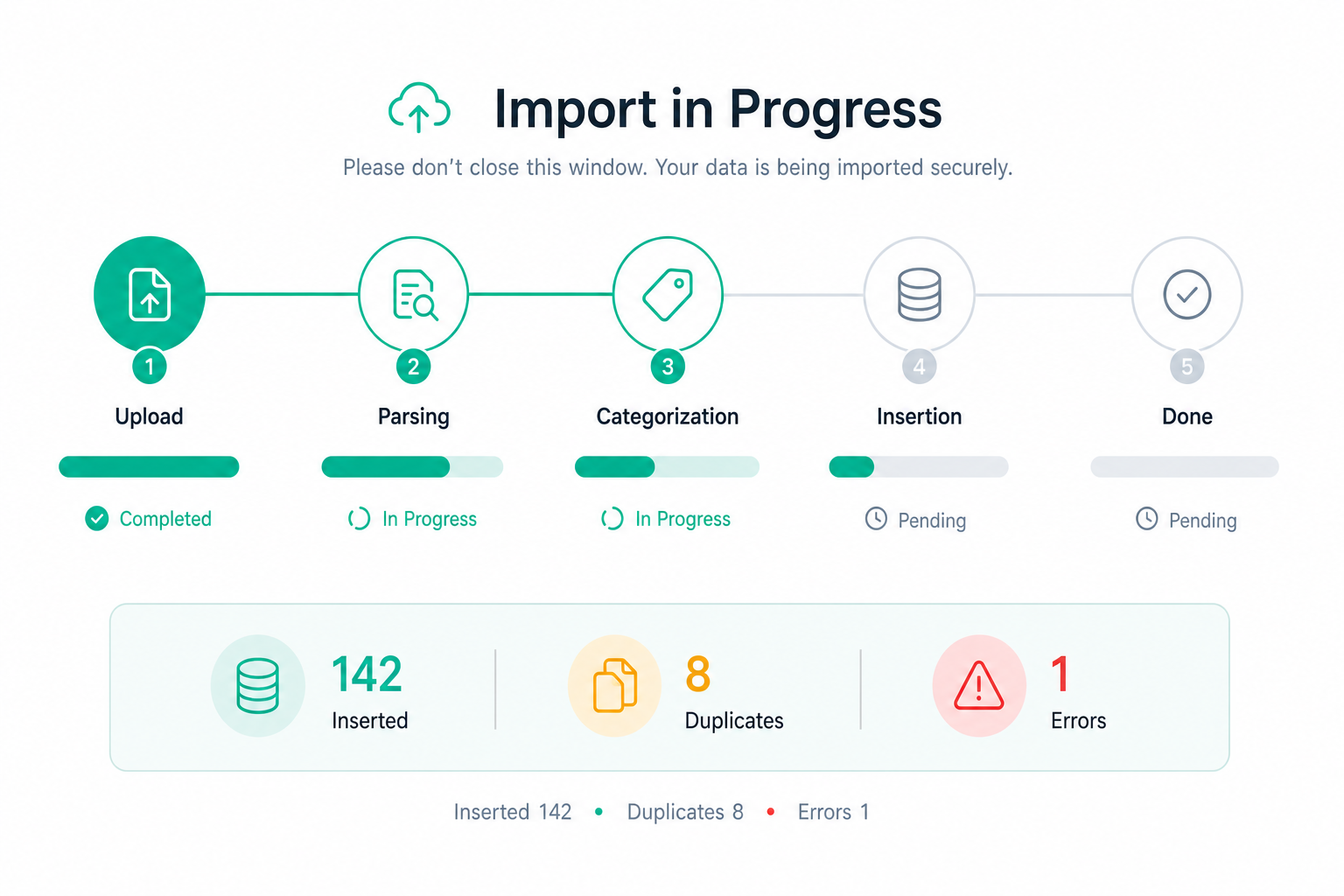
Each stage has its own progress bar, and you can see:
- How many transactions have been inserted
- How many duplicates were skipped
- How many errors occurred (so you know what to check)
The interface shows real-time stats so you don't stare at a loading spinner wondering if anything's happening. You see "Inserted 142 · Duplicates 8 · Errors 1" and you immediately know your file is being processed.
The details matter more than you think
Here's what made this work:
We stream progress from the backend. Each transaction processed triggers an update to the UI. You're not waiting for everything to finish - you see progress in real time as items flow through the system.
We count what matters. Users care about three things: how many transactions made it in, how many duplicates were found (so they don't worry they lost data), and how many errors happened (so they can investigate). Everything else is noise.
We show reliability. When a file takes 45 seconds to process 1,200 transactions, showing that progress builds confidence. You're not wondering if it's broken - you can see 47% done and know exactly how far you are.
We handle the weird cases. What if your upload fails halfway through? You see exactly which transactions failed and why. What if a merchant name is ambiguous? You see the categorization stage taking longer as the AI spends time figuring it out.
Why this changes the experience
Before, uploading transactions felt like a black hole. After, it's transparent.
Users tell us they love watching the progress because it tells them a story: "First it uploaded 1,200 transactions, then it found 47 duplicates from my previous imports, then it figured out that 'SQ *' is my local coffee shop based on my history, and now it's saving everything to my account."
It's not just progress - it's narrative. Each number tells you something about what's in your financial data.
The technical challenge nobody expects
Making this work required us to think about reliability differently. If you stop watching halfway through, we need to remember where we left off. If you close the browser and come back in 10 minutes, your transactions should still be processing correctly.
We couldn't just assume the connection would stay open. We built the progress tracking to persist, so if your browser tab crashes, closing it doesn't lose the work. The backend keeps processing, and when you come back, you see exactly where things left off.
What users actually value
What surprised us: users don't necessarily want faster uploads. They want honest uploads.
They'd rather see "67 duplicate transactions detected and skipped (you already have these)" than have a system silently throw away duplicates without telling them. They'd rather see "1 error: unusual merchant name requires review" than have 1 transaction disappear mysteriously.
Transparency builds trust more than speed ever will.
What's next
We're extending this same pattern to receipts. When you upload a receipt photo, you'll see:
Upload → Straighten → Read → Save → Done
Same idea: show you that we're working on your receipt, where in the process we are, and what we found when we're done.
The bigger lesson
Progress tracking isn't decoration. It's a feature that solves a real problem: the anxiety of waiting for your data to be processed.
When users see real-time feedback, they don't worry. They trust. They upload bigger files. They come back and upload again. They know exactly what happened to their data.
If you're building anything that takes more than a few seconds to process, show your users the work. Don't make them guess. Let them watch the story unfold.