Where does my money go each month? A simple way to find out
May 21, 2026
Most people do not have a "math problem" with money. They have a visibility problem.
You look up and wonder where the month went. The account balance is lower than expected, but nothing felt extreme day-to-day.
The fix is not another spreadsheet. The fix is a repeatable monthly review that is quick enough to keep doing.
Step 1: Start with a category snapshot
Before you analyze individual purchases, zoom out:
- groceries
- dining and coffee
- shopping
- subscriptions
- transportation
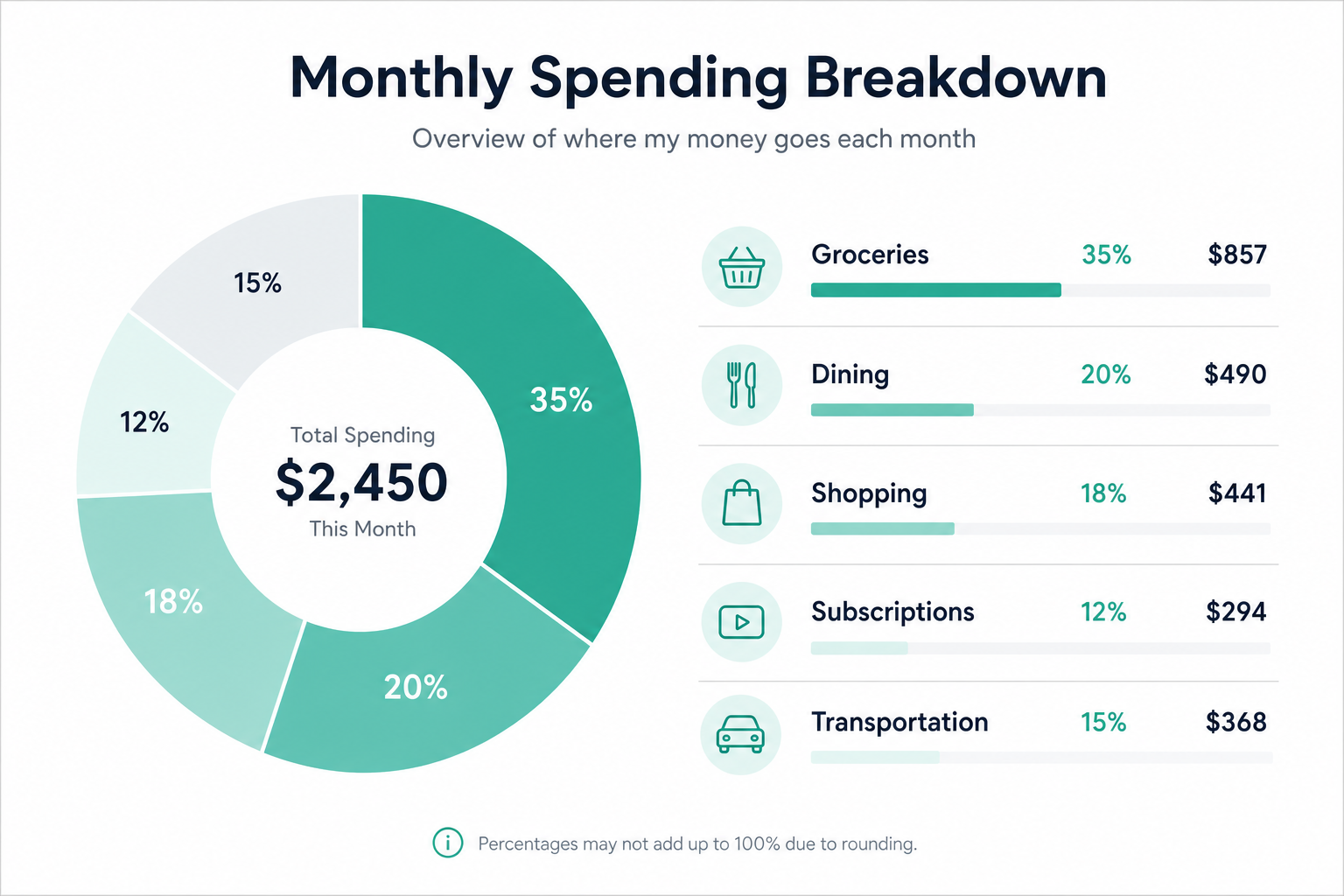
If one of these jumps, you have your first clue.
In Cently, you can check this in your budget and category views. The goal is not perfect categorization. The goal is to spot what changed.
Step 2: Drill into merchants, not just categories
"Dining" alone is too broad. You need to know which merchants are driving the spike.
For example, if dining is up $220 this month, ask:
- Is it one restaurant pattern?
- Is it delivery fees?
- Is it weekday convenience spending?
When you can see the exact merchants and dates, the behavior becomes obvious.
Use transaction-level filtering first. Then ask one direct question in chat:
What changed in dining this month compared to last month?
That single prompt is usually faster than manually scanning every line item.
Step 3: Match receipts when totals look confusing
A lot of "mystery spending" is normal spending with poor context.
A $96 grocery transaction looks suspicious until you see it includes household supplies, not just food. Receipt matching gives you that missing context quickly.
If you regularly ask, "What was this charge again?" this is where a receipt workflow helps most. It turns ambiguous totals into clear records you can trust.
If you want a deeper breakdown of receipts and transaction matching, compare how Cently handles this against other apps in the comparison pages.
Step 4: Find one trend to fix this month
Do not try to optimize everything at once. Pick one trend and set one guardrail:
- "Dining over $450 triggers a warning."
- "Shopping over $300 pauses non-essential purchases."
- "Subscriptions over $120 means cancel one unused service."
This is why pacing alerts matter. A warning on day 10 is useful. A warning on day 29 is just frustration.
Step 5: Ask a forward-looking question
Most spending reviews are backward-looking only. You also need to know what happens if current pace continues.
Ask:
If I keep spending at this rate, which categories will go over budget by month end?
That turns your review from "history lesson" into "decision support."
A 10-minute monthly routine that works
If your schedule is tight, use this checklist:
- Open monthly category totals.
- Identify top two changes from last month.
- Review merchant-level details for those categories.
- Set or adjust one alert threshold.
- Capture one action for next week.
That is enough to reduce surprises and improve control without overcomplicating your system.
The outcome you should expect
Within 30 days, you should be able to answer three questions quickly:
- Where did most of my money go this month?
- Which category changed the most?
- What one behavior should I change next month?
If you can answer those, you are already ahead of most people.
If you want to see this same workflow across all your linked accounts, read How to track spending across multiple bank accounts.
Ready to run your own monthly review? Start your 7-day trial at /auth.